
MeasurePM is excited to introduce a more flexible and customizable way to commit programming data. Users can now control, at the individual target level, whether data is committed as 0 or omitted entirely from graphs when no data is collected.
"No data collected, omit from graph" Checkbox
For Frequency, Duration, and Rate programs, users now have enhanced commit options:
Commit a target at 0 so a zero value appears on the graph, or
Choose to omit the target entirely when no data was collected.
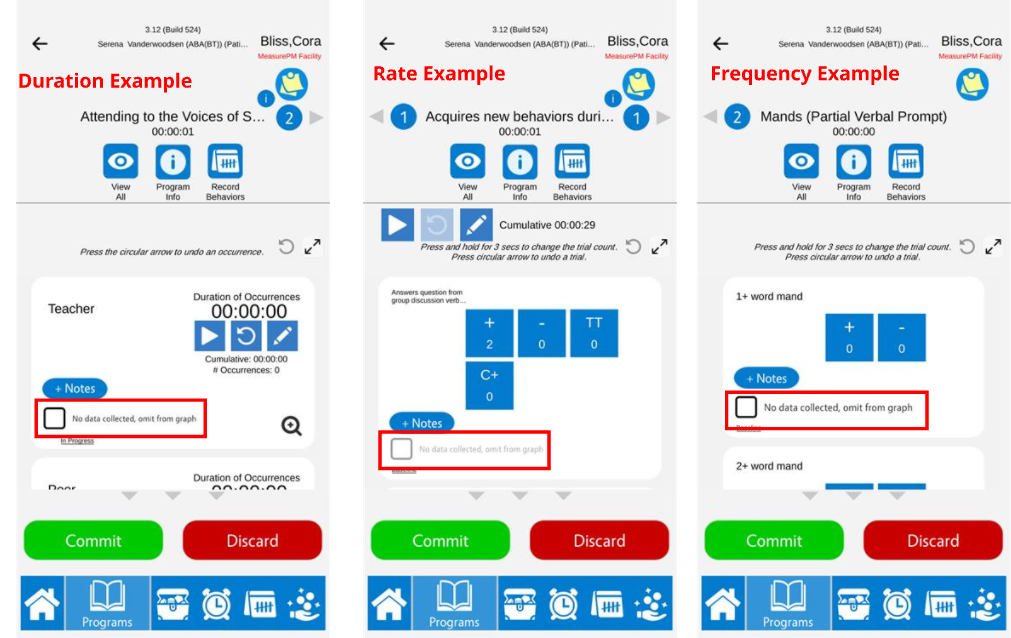
To omit a target from the graph, simply select the “No data collected, omit from graph” checkbox next to the target during the commit process. When selected, no data point will appear on the graph for that target for the day.
Important: Rate targets can only be committed at 0 once time has been added to the rate timer. This allows users to commit without recording a response, resulting in a graphed zero for the day.
When the Checkbox Is Available
The “No data collected, omit from graph” checkbox will appear only under specific conditions:
Duration Targets
Available when no duration has been recorded for the target.
Rate Targets
Available when time has been added to the rate timer but no data recording types have been selected (i.e., no responses were recorded).
Frequency Targets
Available when no occurrences have been recorded for the target.
Once data is recorded for a target, the checkbox becomes unavailable and the target must be committed with its recorded value.
Applies Across All Program Data Views
This logic applies not only to graphs, but to all areas where committed program data is displayed. Whether a target is committed at 0 or omitted using the “No data collected, omit from graph” the committed data will be reflected consistently throughout MeasurePM, including on:
Graphs
SOAP Notes
Program Data
Appointment History
Data Reports
If a target is omitted at commit, it will not appear in any of these areas for that session.
This enhancement allows users to distinguish between “no opportunity occurred” and “opportunity occurred but resulted in zero”, providing cleaner graphs and more meaningful data analysis.
As always please reach out to support@measurepm.com for inquires!