
Overview
A new optional setting is available within Service Type Settings that allows you to require certain service types (such as supervision or group therapy) to fully overlap with another appointment for the same client before they can be rendered.
This setting can be enabled or disabled based on your organization’s needs.
How to Enable This Setting
- Select Site Settings
- Click on Services and Rates
- Select Service Types
- Locate the service type you would like to update
- Click on the Edit icon
- Enable the overlap requirement option
- Click Save
How This Setting Works
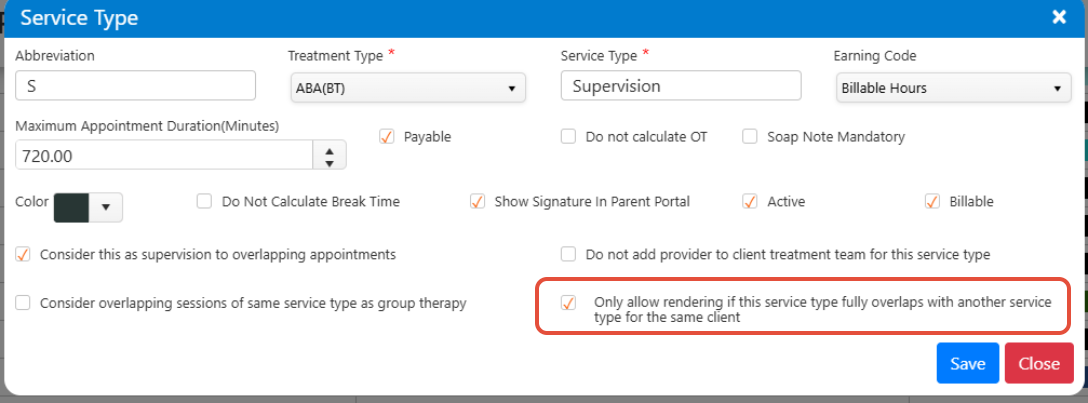
When this setting is enabled for a service type:
- The session can only be rendered if it fully overlaps with another appointment for the same client
- The overlapping appointment can be:
- The same service type, or
- A different service type
- The overlapping appointment must be in:
- Confirmed, or
- Rendered status
If the setting is not enabled, sessions can be rendered as usual without this requirement.
When Rendering Is Allowed
Rendering will be allowed if the service type appointment is fully within the time range of another valid appointment.
Example:
| Appointment Type | Time | Status |
|---|---|---|
| Direct Session | 10:00 AM – 12:00 PM | Confirmed |
| Supervision Session | 11:00 AM – 12:00 PM | Confirmed |
- The supervision session can be rendered because the entire appointment time falls within another valid appointment for the same client.
- Since the supervision session is fully contained within the other appointment time, rendering is allowed.
When Rendering Is Not Allowed
Rendering will not be allowed if the appointment does not fully overlap with another appointment.
Example:
| Appointment Type | Time | Status |
|---|---|---|
| Direct Session | 11:00 AM – 2:00 PM | Confirmed |
| Supervision Session | 1:00 PM – 3:00 PM | Confirmed |
- The supervision session cannot be rendered because only part of the appointment overlaps with another valid appointment.
- The supervision session extends beyond the overlapping appointment time, so the overlap is only partial and rendering is not allowed.
Important Notes
- This rule applies only when the setting is enabled
- The overlapping appointment must be for the same client
- Only fully overlapping time will allow rendering
- The other appointment can be any service type
- If the overlapping appointment is later cancelled, it will not affect sessions that were already rendered
- All other system functionality remains unchanged
Need Help?
If you have any questions or need assistance, please reach out to our support team at support@measurepm.com