
Introduction to the Upgrade
MeasurePM is releasing a new version of the mobile application designed to provide improved performance, better stability, and an enhanced user experience.
Version 3.21.0 will be the latest supported version of the MeasurePM mobile application.
To ensure a smooth transition to the latest version, please follow the recommended installation steps outlined below.
Preparing for the Upgrade
Before updating the application:
- Ensure all current work has been uploaded, saved, or submitted
- Completely close the MeasurePM application
Important: Any offline data stored within the older version of the application that has not been uploaded prior to installing version 3.21.0 will be permanently lost.
This includes:
- Committed data collected in offline mode that has not been synced
- Uncommitted data collected in offline mode
- Any other locally stored un-synced information
Only data that has already been successfully uploaded to the server will remain available after upgrading.
For the best experience and to help prevent application issues, a complete uninstall of the older version is required before installing version 3.21.0.
Installing Version 3.21.0 of the Application
Android Devices (Recommended Update Process)
- Open your device Settings
- Navigate to Apps > MeasurePM
- Select Storage
- Select Clear Data
- Select Clear Cache
- Uninstall the MeasurePM application
- Open the Google Play Store
- Search for MeasurePM
- Verify the application version displayed is 3.21.0
- Select Install
- Wait for installation to complete
iPhone/iPad (iOS) (Recommended Update Process)
- Locate the MeasurePM application on your device
- Press and hold the application icon
- Select Remove App
- Select Delete App
- Confirm deletion
- Open the Apple App Store
- Search for MeasurePM
- Verify the application version displayed is 3.21.0
- Select Download
- Wait for installation to complete
Logging into the New Application
Once installation is complete:
- Open the MeasurePM application
- Enter your login credentials
- Select Login
- Verify the application loads successfully
Troubleshooting & Common Scenarios
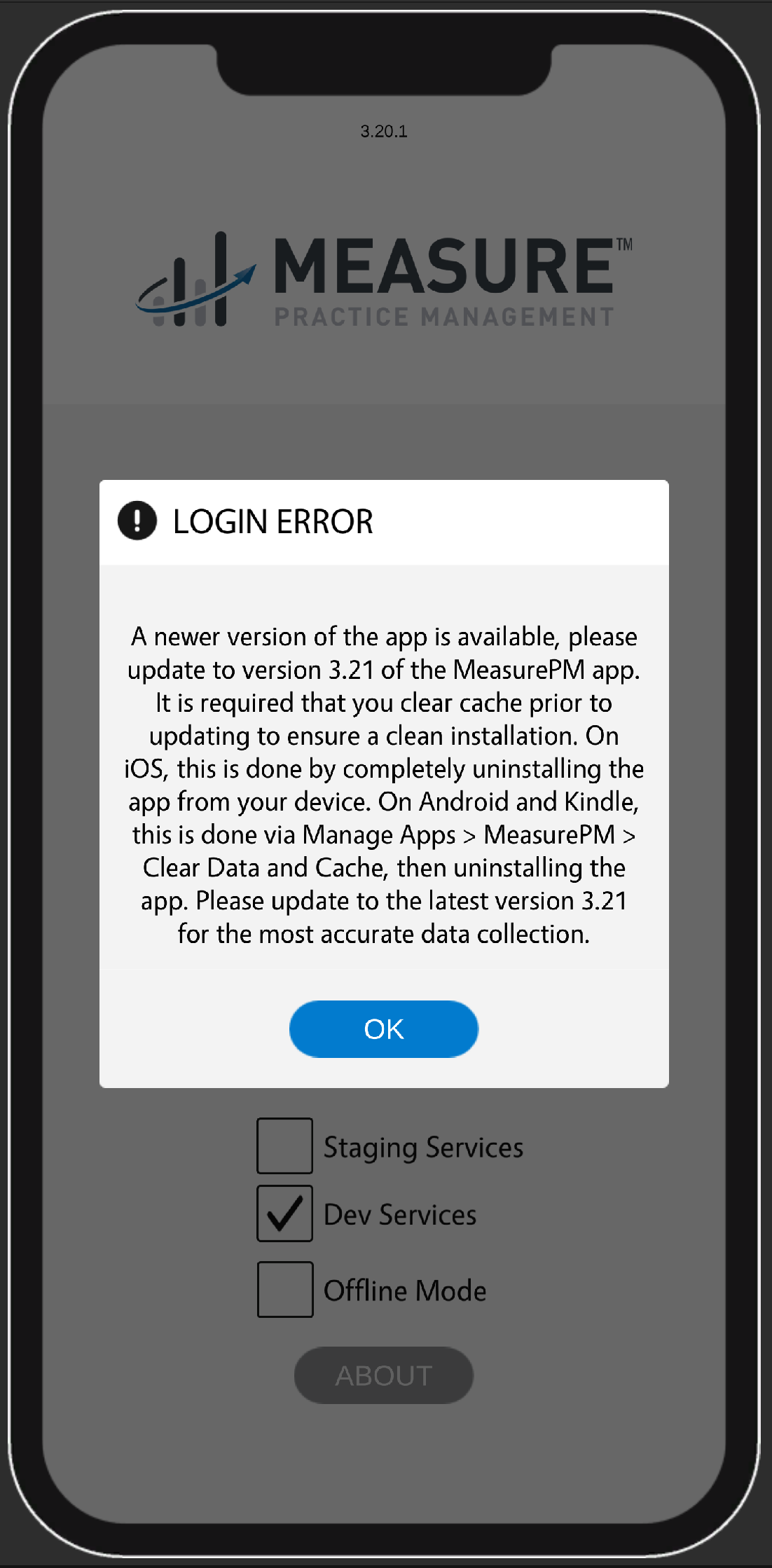
Scenario 1: User Attempts to Log-In Using the Older Version
If a user attempts to log in using an older version of the application after the latest version has been released, an update popup message will appear requesting the user to install the latest version from the app store.
Additional Notes
- Ensure you are installing the latest version available in your device’s app store
- A stable internet connection is recommended during installation
- If issues continue after updating, please contact MeasurePM Support
For any additional comments or questions, please reach out to support@measurepm.com